
<img height="1" width="1" style="display:none;" alt="" src="https://px.ads.linkedin.com/collect/?pid=8778010&amp;fmt=gif">
Skip to content
AI capabilities
 

Imagine finding the right product, getting answers from your business data or turning a customer's email into a draft order with less manual effort.

That's AI with GenetiQ. Built for the way lumberyards, building materials suppliers, and distributors work.

Explore your data   ·   Find products   ·   Turn requests into action

GenetiQ AI Insights Device Mockup

Four ways AI can support your everyday ERP workflows:

Understand it.

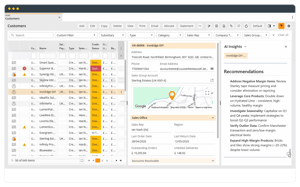
AI Insights

Want to know how a customer is performing? Explore their sales, margins and purchasing patterns without having to piece everything together yourself.


Find it.

Intelligent Search

Your customers don't always use the same product descriptions as you. Find relevant products even when their words don't match your catalog.


Act on it.

Smart Extract

An email, a document or a materials list. Turn everyday requests into draft transactions without typing everything in from scratch.


Connect to it.

MCP Server

Already exploring AI tools like Claude? Connect compatible tools to GenetiQ and discover new ways to work with your ERP data.

 
AI Insights
  • Which products are delivering the best margins?
  • Where could you grow a customer account?
  • What's changed in their buying habits?

AI Insights helps you explore the information already in GenetiQ, identify patterns and uncover opportunities worth investigating.
genetiq-ai-insights-customer
Bring your own AI agent

Ask your ERP a question

What if finding answers about your business was as simple as asking a question?

GenetiQ's Model Context Protocol (MCP) Server lets you connect compatible external AI tools, such as Claude, to your ERP.

In this example, Claude uses information from GenetiQ to:

  • Analyze a customer account
  • Identify outstanding invoices
  • Visualize sales and gross profit

It's another way to work with your business data, with configurable access and the freedom to choose compatible AI tools.

Claude connected to GenetiQ via MCP, displaying outstanding customer invoices and a monthly sales and gross profit chart on a tablet
Smart Extract in action

From a customer request to a draft transaction

A contractor emails a handwritten materials list. Some items are described differently from the products in your catalog.

Smart Extract helps make sense of these everyday requests, suggests product matches and prepares draft transactions for your team to review.

1
Receive a request

A customer sends a materials list containing product descriptions that don't exactly match your catalog.

2
Find the matches

Smart Extract can interpret the information and identify potential product matches using Intelligent Search.

3
Review and proceed

Your team can review the suggested matches, correct any discrepancies and continue with the appropriate sales transaction.

Powerful intelligence.
With you in control.

AI helps your team make decisions and stay in control.

GenetiQ's AI capabilities use different technologies and access arrangements, with controls to support how your business chooses to use them.

Availability, licensing and data handling depend on the capabilities and connections being used.

User permissions

Configure access for individual MCP users.

Configurable access

Control which MCP tools are available.

Business controls

Permissions, validation and audit records help govern supported actions.

Human review

Review AI-assisted suggestions before proceeding where applicable.

FAQs

Understand how GenetiQ AI works

How is my business data handled?

Data handling depends on the AI capability and the service being used. For external AI tools connected through MCP, the provider's terms and data settings also matter. Talk to our team about how data is handled for your GenetiQ setup.

What external AI tools are supported?

GenetiQ's Model Context Protocol (MCP) Server supports connections with compatible external AI tools, such as Claude. Supported tools and functions depend on your configuration.

How are permissions and access managed?

For MCP connections, administrators can configure available tools and user access. Existing GenetiQ permissions, validation rules and audit records help govern supported actions.

Which AI capabilities are available for my GenetiQ setup?

Feature availability may vary by application, version, configuration and license. Our team can help confirm which capabilities are available for your GenetiQ setup.

What could AI do for your business?

Let's see where AI could save your team time in their day-to-day work.