
<img height="1" width="1" style="display:none;" alt="" src="https://px.ads.linkedin.com/collect/?pid=8778010&amp;fmt=gif">
Skip to content

Explore how GenetiQ helps you solve your biggest business challenges:
 

Stock and inventory management →

Gain real-time visibility and control across
all locations and product levels.

Related features:
Warehouse management | Point of sale


Customization and personalization →

Configure GenetiQ to match your workflows,
processes, and business needs.

Related features:
Workflow automation | CRM and marketing


Business intelligence & reporting →

Turn data into insights with powerful
dashboards and custom reports.

Related features:
BI and reporting | Financials and accounting


Financial management for LBM →

Manage finances, control margins, and
ensure accuracy with confidence.

Related features:
Financials and accounting | BI and reporting


Sales and order management →

Streamline quotes, orders, and fulfillment
from counter to delivery.

Related features:
Point of sale | CRM and marketing | Inventory management


Integration & connectivity →

Connect your systems, streamline data,
and eliminate manual processes.

Related features:
Workflow automation | CRM and marketing | Mobile access

Warehouse management software for LBM suppliers

Give warehouse teams handheld workflows for inventory counts, barcode scanning, transfers, picking, packing and receiving — all connected to live GenetiQ inventory data.

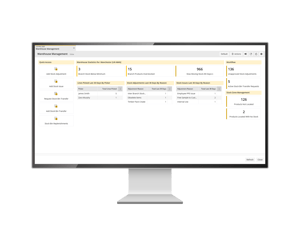
See warehouse management in action
_graphic for warehouse management
Work from handheld devices
 
Keep inventory updates connected
 
Reduce manual warehouse admin
 

Warehouse workflows supported by GenetiQ

Use MWS to manage the core warehouse tasks that keep stock moving, orders progressing and inventory records up to date. 
Receiving and goods in Serve customers in seconds with smooth, seamless transactions.  
Order picking Send picking notes to handheld devices so warehouse teams can find and pick the right products more efficiently.  
Packing Support packing workflows by recording package types, contents and order details as part of the fulfillment process.  
Barcode scanning Assign and scan barcodes to check product details, stock quantities and other key information from the warehouse floor.  
Stock transfers Move stock between bin locations and support warehouse stock movement without relying on manual updates.  
Stock adjustments Make stock adjustments from handheld devices, helping teams keep stock records aligned with what is happening on the floor.  
Offline capture and sync Capture data offline where needed, then sync updates once the connection is restored.  
Reports and alerts Use configurable reports and alerts to support the warehouse processes and exceptions that matter to your business.  
Stock counts and stock takes Support full stock takes, partial counts and rolling stock takes to help maintain better inventory accuracy.  

Built for handheld warehouse and yard work

Warehouse teams should not have to return to a desk for every stock update. With MWS, users can complete key stock tasks from handheld devices, helping teams work where the stock is: in the warehouse, yard or receiving area.

  • Fast to use.
  • Connected to GenetiQ.
  • Designed for everyday warehouse tasks.
  • Useful for receiving, picking, packing, scanning, transfers and counts. 
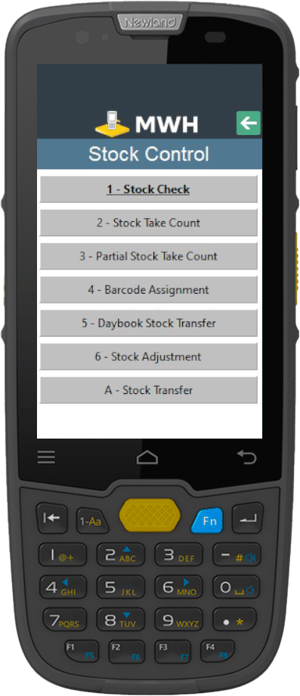
Barcode Scanner MWS Stock

Why your team will love it

Boost productivity
Work faster with real-time data and reduce time-consuming manual tasks.
Reduce errors
Accurate inventory management minimizes picking errors and stock discrepancies.
Enhance flexibility
Adapt workflows to your specific needs and get real-time updates from anywhere.

Standalone WMS vs GenetiQ ERP

A standalone WMS can help manage warehouse activity. But for LBM businesses, warehouse work affects more than the warehouse. It affects sales orders, purchasing, stock availability, reporting, delivery planning and customer service. GenetiQ connects warehouse management with the wider ERP process.

Connected GenetiQ features

Warehouse management works best when it is connected to the rest of your operation. GenetiQ links warehouse workflows with stock, sales, purchasing, reporting and customer-facing processes. 


See warehouse management in action

See how GenetiQ supports warehouse and yard teams. 
Schedule a personalized demo
Latest webinar

Protect margin.

Improve accountability.

Sell smarter.

GenetiQ Product Director Gary Brookshaw and Bradley Hartmann share practical ways LBM sales teams can use better visibility and data to improve performance.

Built on decades of industry experience.

Watch the conversation now 👉


Frequently asked questions

Q. What is the GenetiQ Mobile Warehouse Solution? A. It's a mobile system that allows your warehouse team to manage inventory, pick orders, and perform various warehouse tasks using handheld devices. 
Q. How can MWS benefit my lumber and building materials business? A. It can improve productivity, increase accuracy, reduce errors, and provide real-time inventory updates, all of which are crucial in the fast-paced LBM industry. 
Q. Does it work in real-time? A. Yes, the system operates with a live connection to your GenetiQ system, ensuring your team always has access to up-to-date information. 
Q. Can it help with stock management? A. Absolutely. It allows for easy stock adjustments, counts, and transfers right from the warehouse floor. 
Q. How does it handle order picking? A. Order picking notes are sent directly to handheld devices, guiding your team efficiently through the warehouse. 
Q. Can it help with receiving inventory? A. Yes, you can create goods-in purchase delivery notes at the point of entry, speeding up the receiving process. 
Q. Does it support barcode scanning? A. Yes, it uses 'point and scan' technology, making it easy to check prices, stock quantities, and other product details. 
Q. Can it help with stock takes?  A. Definitely. It supports full stock takes, partial counts, and even rolling stock takes, making inventory management more efficient. 
Q. Is it difficult to learn? A. No, the system is designed to be user-friendly with minimal training required. 
Q. Can it work across multiple locations? A. Yes, if you have remote sites with Wi-Fi access, you can implement MWS across locations to manage stock movement. 
Q. How does it help with accuracy? A. By reducing manual data entry and paperwork, it significantly cuts down on human errors in the warehouse. 
Q. Can it help with labeling? A. Yes, the system allows warehouse staff to print labels immediately via a remote printer or queue them for later printing. 
Q. Can the MWS help with stocktaking? A. Yes, it allows for quick and accurate stock takes, including rolling stock takes and partial stock counts. 
Q. How does the system handle goods received? A. The MWS allows staff to create goods-in purchase delivery notes at the point of entry, speeding up the booking-in process. 
Q. Can it assist with sales packing? A. Yes, the system supports packing processes, allowing operators to detail package types and contents. 
Q. Does the MWS help with purchase returns? A. Absolutely. Purchase returns notes can be created directly on the handheld device when goods need to be returned to suppliers. 
Q. Can warehouse staff request product labels using the system? A. Yes, the warehouse team can print labels immediately via a remote printer or queue them for later printing. 
Q. How does the MWS handle stock transfers? A. The system facilitates quick movement of stock from one bin location to another. 
Q. Can it help with purchase requisitions? A. Yes, warehouse staff can place purchase requisitions while at the physical stock bin location. 
Q. Does the system support barcode assignment? A. Yes, you can assign inner and/or outer barcodes to stock as it enters your warehouse.