



ERP Implementation
A Preparatory Guide
Preparation is the key to success
Implementing or changing an ERP system is a big undertaking. Deployment of a new system, of any scale, will inevitably bring changes to both data and processes across your entire organisation. The risk of not realising all of the benefits you envisioned is high.
Analyst firm Gartner estimates that 55–75% of ERP projects fail to meet their objectives, often due to poor planning and unclear expectations at the start of the project.
As the saying goes, ‘fail to prepare, prepare to fail’. Your ERP vendor will be your key partner as you progress through your implementation process, but note the use of the word ‘partner’. Your ERP vendor is there to provide the expertise you need to realise desired benefits, minimise downtime, accelerate staff acceptance and complete your project on time and within budget.
However, make no mistake. If you are to truly extract the full range of benefits expected from your new ERP software, you must prepare as much as you can for the implementation process you are about to embark on. This guide sets out the best practice preparatory work you can, and should, carry out in order to ensure your implementation is as smooth as possible.

Key steps in this guide
This guide covers the essential preparation steps organisations should complete before beginning an ERP implementation. Navigate to any section to learn how proper planning increases the likelihood of a successful rollout and system adoption.
Step 1: Define your ERP project objectives
While your vendor can and should help you to decipher what features and benefits your new system can provide, best practice suggests that you should begin by establishing clearly thought-out core objectives.
This ensures the software features you require to run your business, and their related benefits, are not overshadowed by glamorous feature add-ons that may add little or no value.
Think about what you’re trying to achieve. What limitations are you encountering in your current system? Consider improvements you want to make across your entire organisation.
Make your objectives definite, specific statements about what you intend to accomplish. Vague statements have no place on your goals list. Make them as quantifiable as possible.
Clear objectives allow businesses to evaluate ERP solutions based on outcomes rather than being influenced by features that may add little value.
Step 2: Document your business processes
It’s crucial that your ERP vendor understands how your business currently operates and how you want it reflected in your new system.
Each business has its own nuances, idiosyncrasies, whatever you want to call them, but in essence, they make you… you.
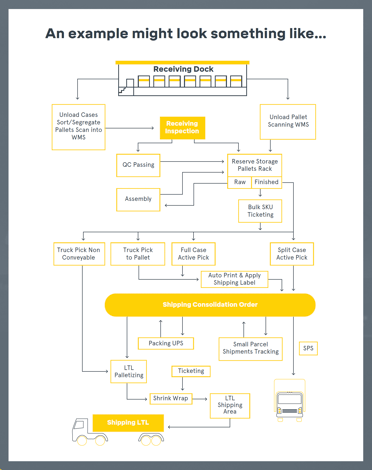
There are many workflow tools available online that enable you to easily create workflow charts for your organisation.
The use of workflow charts can prove incredibly useful here, helping you to capture your business modus operandi in a very visual, easy-to-understand format.
With today’s ERP systems now using the latest technologies, you can surround yourself with any amount of data, KPIs, etc. The key is to tailor it to your specific needs and that of each end user.
The creation of workflow charts is often considered a tedious task but in our experience, has repeatedly proven to be worth its weight in gold as you progress through your project deployment.
Want the planning templates for each step?
Download the workbook to access practical planning tools to support your ERP implementation project.Step 3: Build your ERP project team
Your ERP system forms the backbone of your business; a migration of systems must be managed by a competent project team that has full support from your senior management. Your team should consist of senior managers across the business to ensure all departments affected by the implementation are validly represented.
This will aid acceptance of the system as each department adopts a certain level of project ownership relating to their particular area of expertise. The other key members of the project team will include your software vendor who will assign a project manager and consultant(s) to your ERP implementation project.
A typical ERP project team consists of:
Executive Sponsor
Responsibility:
Owns budget, removes internal barriers and oversees project progress.
Who:
Senior stakeholder within your organisation
System Owner
Responsibility:
Internal champion responsible for system configuration and key decisions.
Who:
Key operational stakeholder (not necessarily the sponsor)
Sales Team Lead
Responsibility:
Provides legacy data and signs off user acceptance testing (UAT).
Who:
Internal sales lead
Purchasing Team Lead
Responsibility:
Provides legacy data and signs off UAT for purchasing processes.
Who:
Internal purchasing lead
Inventory Team Lead
Responsibility:
Provides stock data and signs off UAT for inventory processes.
Who:
Internal inventory or warehouse lead
Finance Team Lead
Responsibility:
Provides financial data and signs off UAT for finance modules.
Who:
Internal finance lead
Project Manager
Responsibility:
Manages scope, timelines and overall project delivery.
Who:
ERP software partner
Consultants
Responsibility:
Configure the system in line with business requirements.
Who:
ERP software partner
Hardware / IT Support
Responsibility:
Ensures infrastructure or cloud environment supports the system.
Who:
Internal IT team or third-party provider
Step 4: Preparing for change
The importance of your ERP project and its impact on your wider organisation should not be underestimated. Failing to appreciate the cultural barriers and change implications that could arise is a major oversight.
Take the time to review your current situation and how this change will impact your business and staff. How will the process be managed? Are there any cultural implications?
Creating a change management strategy alongside your implementation plan helps limit the resistance to a new system and can identify any problems before they become disruptive to day-to-day business.
Some of the key areas to include in your change management:
Staff communication
Schedule regular meetings/briefings with all affected staff throughout the project.
Training
Training requirements may differ per staff member.
Ongoing support
In addition to broader training needs, all software vendors provide ongoing support services.
Download the ERP Implementation Workbook
Includes planning templates, project worksheets and preparation checklists.Step 5: Prepare your data
As the saying goes… ‘Garbage in, Garbage Out’. The importance of undergoing the data cleansing process at the pre-implementation phase should not be underestimated.
Ensuring your project starts out with clean, accurate and relevant data will save you time and money in the long run.
Take the time now to decide how much historical data you wish to migrate to the new system and indeed how much data must be migrated for compliance reasons. Ensure all duplicates, irrelevant and incorrect data is removed from the system pre-migration.
This is not a glamorous job but the effort expended here will reap huge rewards down the line. Assign the appropriate employees to the task and provide them with the time allowed to complete this task fully. The employee selected for this task must have an eye for detail and a solid working knowledge of the data that will enable them to extract your most relevant data.
Before migrating data into your ERP system, organisations should review their data for:
-
Duplicate records
-
Outdated information
-
Incomplete data fields
-
Irrelevant historical records

Step 6: Understand the implementation journey
Every vendor will have a different approach to implementing their ERP solution. We can only vouch for ours within this guide and showcase this as a topline example process.
Typical stages include:
Download the ERP Implementation Workbook
Includes planning templates, project worksheets and preparation checklists.Download the ERP implementation workbook
Access practical planning tools to support your ERP project preparation.Includes:
- ERP planning templates
- Workflow mapping tools
- Project team planning guide
- Data preparation checklists

ERP implementation FAQs
There is no ideal time for undertaking a project like this, but we would suggest considering the following when choosing the ‘when’ for your project:
• Some companies favour a ‘financial year end’ as this makes a clear break, which is fully auditable with opening balances provided by the accountant.
• A ‘month-end’ should be chosen so that the audit trail is maintained by the common month-end reports on Accounts Receivable, Accounts Payable, Trial Balance, etc.
• The availability of resources to do data cleansing, training, user acceptance testing, etc., can play a major part in choosing when to go live on a new system. Vacation periods, Christmas, etc must all be taken into consideration to ensure that the key people involved are free to take part in the project.
• Companies should also take seasonal considerations into account when deciding on a go-live date. Most businesses have busy periods where they do not need the distraction of a system change on the agenda when they should be putting resources into sales.
This depends on whether the ERP system is cloud-based, hosted or deployed on-premise.
• When considering a new ERP system, it is important to get professional assistance in evaluating the network, PC requirements and deployment methods (cloud, hosted or hybrid) for your software.
• The investment required will depend on the age and condition of the existing infrastructure and the specifications required for the new software.
• Different software systems have different needs when it comes to resource and licence requirements; all of which will have a cost impact on your overall project.
In most cases, a new system should be able to design the necessary outputs to accommodate the existing stationery. However, we would advise that you need to analyse the cost of the time it takes to redesign the output forms to see if it is worthwhile. The rollout of a new system is an opportune time to make sure that your corporate image is supported on your invoices, purchase orders, statements, etc.
• Switching to laser output forms may be a move worth considering, leading to reduced costs on pre-printed stationery. The capabilities of modern systems also extend to greater use of electronic communication and document management, and this should be embraced as part of the solution.