
<img height="1" width="1" style="display:none;" alt="" src="https://px.ads.linkedin.com/collect/?pid=8778010&amp;fmt=gif">
Skip to content

We cater to diverse industries. If your sector isn't listed above, contact our experts to explore potential compatibility.    Are we a good fit →

GenetiQ_Cloud_Primary
Our next-generation cloud ERP
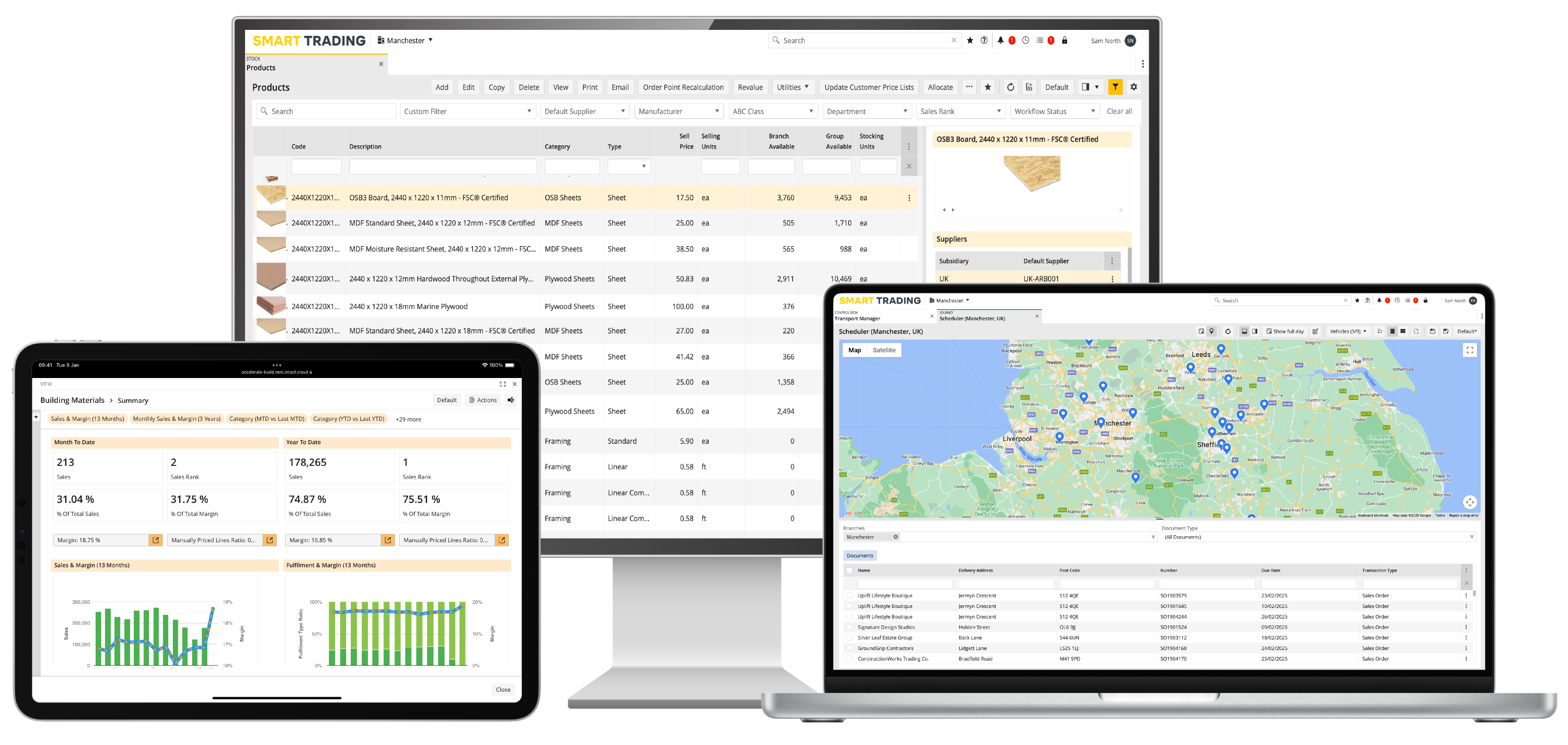
GenetiQ ERP Laptop and iPad

Browser-based solution with industry-leading personalisation and flexibility.

GenetiQ_XLine_Primary
Formerly Intact Xline

Low cost solution for small businesses, hosted on your desktop or in the cloud.

GenetiQ On-Premise Desktop Solution
Formerly Intact iQ

A feature-rich desktop ERP platform with flexibility and customisation at its core.

Wondering which of our solutions would be best for your business?  Compare GenetiQ solutions →


Which business challenges are you trying to solve?
 

Stock and inventory management

Gain real-time visibility and control
across locations and product levels.

Related features:
Warehouse management | Point of sale | Mobile access


Customisation and personalisation

Adapt GenetiQ around your workflows, roles
and business processes.

Related features:
Workflow automation | Mobile access | CRM and marketing


Business intelligence and reporting

Turn live data into clearer decisions with
dashboards and flexible reporting.

Related features:
BI and reporting | Financials and accounting


Sales and order management

Streamline quotes, orders and fulfilment
from counter to delivery.

Related features:
Point of sale | CRM and marketing | Inventory management


Integration and connectivity

Connect your systems, streamline data,
and eliminate manual processes.

Related features:
Workflow automation | Cliqx ecommerce | Clover payments


Financial management

Manage finances, control margins, and
ensure accuracy with confidence.

Related features:
Financials and accounting | BI and reporting

Multi-branch and location management

Keep every branch connected without losing local control

Manage sales, stock, purchasing and operational workflows across multiple branches and locations in one ERP, helping head office and branch teams work from shared information while keeping day-to-day activity visible locally.

genetiq-branch-transfers-workflow
Connected branch operations
 
Clearer stock visibility across locations
 
More control over interbranch activity
 

Keep branch operations connected without slowing local teams down

Running multiple branches means balancing local flexibility with shared control over stock, purchasing, sales and operational processes. When each location works from separate systems or disconnected information, it becomes harder to see what is happening across the network and coordinate activity between branches.

GenetiQ connects branch-level operations through shared ERP data and workflows, helping teams manage local sales, stock and fulfilment activity while keeping interbranch movements, purchasing responsibility and exceptions visible across the wider business.

Keep branches working from shared information

Use connected customer, product, supplier and transaction data across sales, stock, purchasing and reporting workflows. 

 
Manage stock across locations

Keep stock activity visible across branches, warehouses, zones and bins, with dedicated workflows for transfers and inventory movement. 

 
Balance central control with local operation

Support centrally managed structures and purchasing responsibility while branches continue to handle day-to-day sales, stock and fulfilment activity. 

 
A connected workflow

Connect branch demand, stock movement and local fulfilment

GenetiQ connects branch-level sales, stock and purchasing activity with interbranch transfer workflows, helping teams respond to local demand while keeping movement between locations visible across the wider business. 

1
Local demand identified

Customer orders, stock requirements or replenishment activity create a need at branch level.

2
Stock position reviewed

Teams can review local stock and stock available across the wider branch network before deciding how demand should be fulfilled.

3
Transfer or purchase activity created

Depending on the configured process, demand can result in purchasing activity or an interbranch transfer request.

4
Sending branch prepares stock

Outgoing transfer activity progresses through warehouse and Goods Out workflows.

5
Receiving branch takes delivery

Incoming transfer deliveries are handled through Goods In and branch transfer workflows.

6
Exceptions and follow-up managed

Incoming and outgoing IBT exceptions remain visible so teams can deal with issues as they arise.

Keep interbranch transfer activity visible in one place

The Branch Transfers Workflow Control Desk gives teams a clear view of incoming and outgoing transfer requests, deliveries and exceptions, helping both sending and receiving branches stay aligned as stock moves between locations.
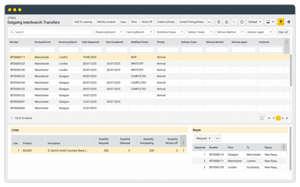

Branch Transfers Workflow Control Desk in GenetiQ showing incoming and outgoing interbranch transfer requests, deliveries and exceptions.

Give branch teams more control without losing network-wide visibility

GenetiQ connects branch-level sales, stock, purchasing and transfer activity through shared workflows, helping local teams manage day-to-day operations while giving the wider business clearer visibility across locations. 

Interbranch transfers

Manage incoming and outgoing transfer requests, deliveries and exceptions through dedicated branch transfer workflows.

Multi-location stock control

Manage stock across branches, warehouses, zones and bins, with location-level stock movements and inventory processes.

Central and local purchasing

Organise buying responsibility across multiple branches while allowing local teams to raise and manage purchasing needs within controlled workflows.

Branch-level workflow visibility

Give branch teams dedicated operational views for sales, stock, transfers and other work that needs attention.

Keep branch operations connected across the wider business

Branch activity depends on sales, purchasing, stock and fulfilment working together. GenetiQ connects those processes so local teams can manage day-to-day work while shared information and transfer activity remain visible across the network.

Sales and order processing

Keep branch sales activity, quotations, orders and fulfilment requirements connected to the wider ERP process.

Explore sales and order processing
 
Purchasing and replenishment

Coordinate buying responsibility across branches and use replenishment processes to support local demand, purchasing activity and interbranch transfer documents.

Explore purchasing and replenishment
 
Transport, delivery and proof of delivery

Connect branch and warehouse despatch activity with the transport and delivery work that follows.

Explore transport and delivery


bullet-arrow

Turn connected branch operations into better day-to-day control


By connecting branch sales, stock, purchasing and transfer activity, GenetiQ helps teams coordinate local operations more effectively while giving the wider business clearer visibility across locations.

Better visibility across branches

Keep branch activity, stock movements and transfer workflows visible without relying on separate systems or spreadsheets.

More coordinated stock movement

Use interbranch transfer workflows to move stock between locations and keep both sending and receiving branches aligned.

More consistent local operations

Give branch teams structured workflows for sales, stock, purchasing and fulfilment while keeping shared ERP data connected.

Stronger central oversight

Support head-office and multi-branch teams with shared reporting, purchasing structures and branch-level operational visibility.

Give branch teams clearer visibility across locations

GenetiQ helps multi-location businesses keep branch activity connected through shared sales, stock, purchasing and transfer workflows. That gives local and central teams a clearer view of what is happening across the network and where action is needed. 

“We can see at an instant stocks in each of the branches, so if somebody hasn’t got what the customer is looking for we can tell them, ‘well you can take a trip across there’ or ‘we will have it for you in a couple hours or the next morning’. Access to that information by all sales staff has been really helpful and helped drive growth within the business.”
Eurosales
Euro SalesIreland
“I can see straight away how each of the three depots are doing and the reports can be customised for me as a business owner, and for the CFO and then for the GM’s in each site as well.”
Clondalkin Builders Providers
Clondalkin Builders ProvidersIreland
“We have live information, we have live proper stock, the deliveries, stock transfers, everything just pulls together perfectly."
KCR Builders Providers
KCR Builders ProvidersIreland
GenetiQ solutions

Multi-branch and location management in GenetiQ

Multi-branch and location management runs across the wider GenetiQ platform, connecting branch sales, stock, purchasing, fulfilment and reporting through shared ERP data and workflows.

For businesses operating across multiple branches, warehouses or stock locations, GenetiQ supports local day-to-day operations while helping central teams maintain visibility of interbranch transfers, purchasing responsibility, stock activity and branch performance.

For businesses of any size

GenetiQ

GenetiQ Multiscreen for Website-1

A flexible ERP platform for merchants, wholesalers and distributors that brings core business operations together in one connected system.

Where the access method matters, GenetiQ is available through a browser application or desktop application. Both are part of the same GenetiQ platform.

For smaller businesses

GenetiQ Xline

Xline with MWS 2

GenetiQ Xline is a separate business management solution designed for smaller businesses with less complex requirements.

Frequently asked questions

What is multi-branch ERP software?

Multi-branch ERP software helps businesses manage sales, stock, purchasing and operational workflows across more than one branch or location. In GenetiQ, branch activity is connected through shared ERP data, interbranch workflows and reporting so local and central teams can work from the same operational information. 

Can GenetiQ manage stock across multiple branches?

Yes. GenetiQ supports stock activity across multiple branches, warehouses, storage zones and bins, with workflows for goods in, goods out, stock movement and interbranch transfers.

Can stock be transferred between branches?

Yes. GenetiQ supports incoming and outgoing interbranch transfer workflows, including transfer requests, deliveries and exception handling for sending and receiving locations.

Can purchasing be managed across more than one branch?

Yes. Purchasing responsibility can be organised across multiple branches through Buyer Departments, helping businesses support both local purchasing activity and more centralised buying structures.

Can branch performance be reported in GenetiQ?

Yes. Branches can be used as a reporting dimension within GenetiQ, allowing businesses to analyse branch activity alongside other areas such as customers, products, suppliers and sales performance.

Ready to bring more control to multi-branch operations?

See how GenetiQ can help your teams connect branch sales, stock, purchasing and interbranch activity, giving local and central teams clearer visibility across the wider business.

Online demo